
Free GST billing software
for your local shop
Open-source desktop POS with GST invoices, barcode scanning, receipt printing, inventory and sales reports. Works offline on your own computer.
Version 0.1.3 · Windows is the supported platform
- Works offline
- No subscription
- GST ready
- Data stays on your PC
Features
Everything a small shop needs
Bill fast at the counter and keep stock under control.
Retail POS billing
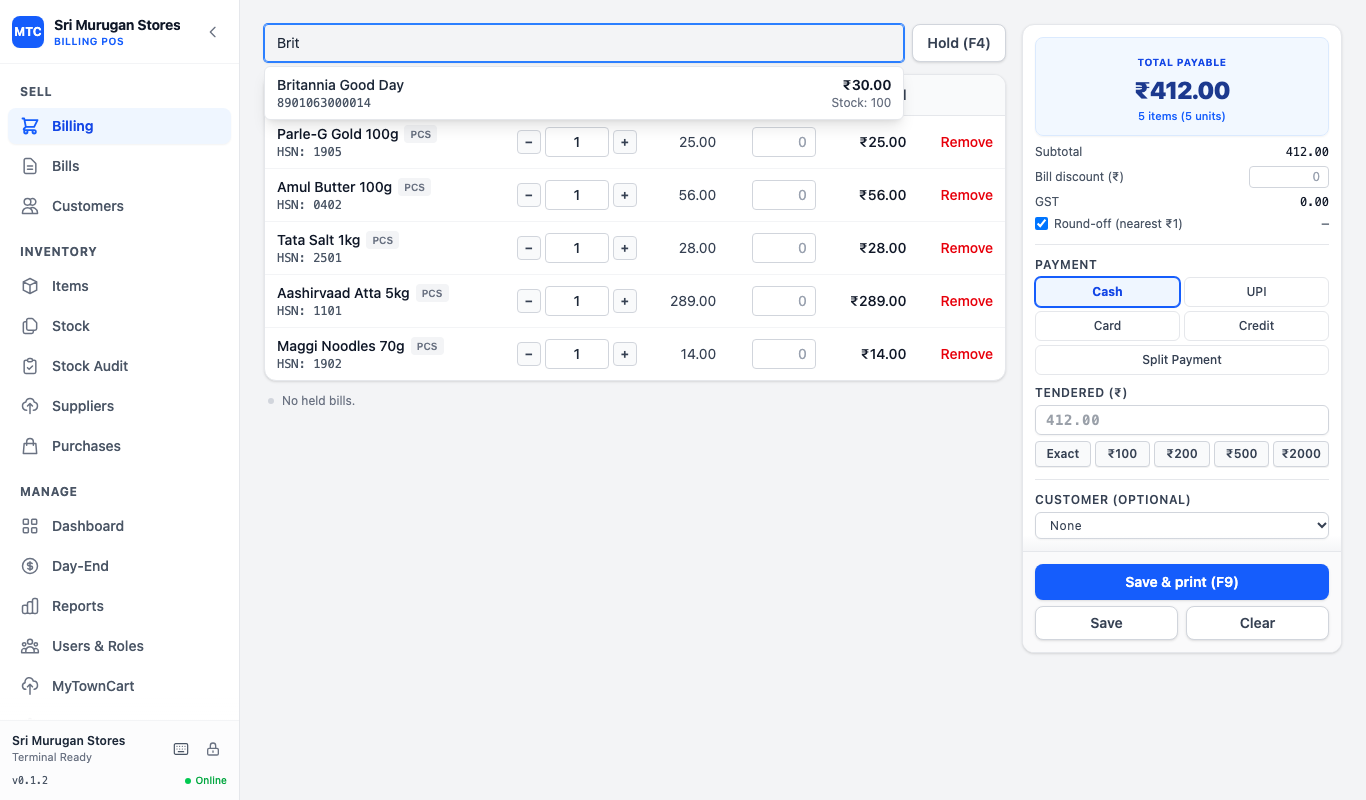
Add products by barcode or name, change quantities, and hold and resume bills.
GST invoices
GST registration, tax-inclusive or exclusive prices, and CGST/SGST calculations.
Receipts & invoices
Preview and print 58 mm or 80 mm receipts and A4 invoices.
Payment recording
Record cash, UPI, card and customer credit sales, with change calculation.
Product catalog
Prices, MRP, barcodes, categories, units, photos, and CSV import/export.
Inventory
Stock levels, low-stock indicators, adjustments, and movement history.
Customer records
Names and phone numbers linked to bills and credit sales.
Sales reports
Daily sales, item sales, and payment-mode totals with CSV downloads.
Encrypted backups
Back up and restore to a folder you choose, protected by a recovery key.
MyTownCart integration
Optionally publish products and sync marketplace orders and stock when online.
What’s new
More ways to run your shop
Recent source improvements · November 6, 2026
The latest published installer is v0.1.3. The improvements below describe current source development and may require a newer build. Publishing this website does not update the installer.
Flexible counter billing
Search suggestions, discounts, round-off and split payments, with customer credit balances and payment collection.
Returns & purchases
Credit notes, supplier records, purchase receiving and cost prices for profit reporting.
Daily shop controls
Sales dashboard, stock audits, barcode labels, loyalty balances and day-end cash reconciliation with a Z-report.
Reports & languages
Sales and payment charts, profit summaries, GSTR-1 CSV datasets for review, and English, Tamil and Hindi selection.
Refreshed interface
Development updates bring clearer navigation, page headers, forms, tables and helpful empty states.
LAN access & release notices
Development builds add optional browser access on a trusted shop network and release notifications that open GitHub for manual installation.
Download
Choose your installer
Latest release: loading… — published automatically from GitHub Releases.
Builds are unsigned, so your OS will warn you on first launch. Back up your shop data before upgrading.
Install on your device
Windows 10 / 11
- Download the Windows installer above and run it.
- If SmartScreen says Windows protected your PC, click More info → Run anyway.
- Optional: check the download. In PowerShell run
Get-FileHash .\MyTownCart-Billing-windows-x64.exe -Algorithm SHA256and compare withchecksums-windows-x64.txton the release page. - Open MyTownCart Billing from the Start menu and follow the setup wizard.
Upgrading: just run the newer installer; your data is kept. Use the MSI if your IT team deploys software.
macOS
- Pick the right file: → About This Mac. A chip named Apple M1/M2/M3… means Apple Silicon; Intel means Intel.
- Open the downloaded
.dmgand drag the app to Applications. - Because the app is not notarized, macOS may say it is damaged. In Terminal run:
xattr -cr "/Applications/MyTownCart Billing.app"
Then open it again (or right-click → Open). Verify with shasum -a 256 <file> against the checksum file for your Mac.
Linux
Debian / Ubuntu: sudo apt install ./MyTownCart-Billing-linux-x64.deb
Other distributions: chmod +x MyTownCart-Billing-linux-x64.AppImage && ./MyTownCart-Billing-linux-x64.AppImage (needs WebKitGTK 4.1).
Verify with sha256sum --check checksums-linux-x64.txt in the download folder.
Phone or tablet (Android / iPhone / iPad)
There is no phone or tablet app. A phone or tablet can use billing through a browser while the desktop app runs on a computer on the same shop Wi-Fi: on the computer open Settings → LAN server, start it, then open the shown address (or scan the QR code) on the phone and enter a PIN. See the LAN guide. This needs a build that includes the LAN server and a trusted network.
Get started
Get started in five steps
- Install the app from the download section above.
- Enter your shop name, GST settings, and invoice prefix.
- Add products with prices, barcodes and opening stock, or import a CSV.
- Scan or search products, record the payment, then save and print your first bill.
- Set up encrypted backups in Settings and keep your recovery key somewhere safe.
Guides: shop operator guide · screens & workflows · backups · marketplace sync
Handy shortcuts: F2 scan field · F4 hold bill · F9 save & print.
Your data stays on your computer
Bills and customer data live in a local SQLite database on the shop's PC. Linking a MyTownCart account sends catalog fields, stock changes and order pulls to the marketplace. Development builds can also share shop data with LAN browsers when the optional server is enabled, and contact GitHub to check for new releases. Backups are encrypted before they are written, and diagnostics are off by default.
FAQ
Frequently asked questions
Is it really free and open source?
Yes, under the Apache License 2.0. The MyTownCart name and logo are covered by a trademark policy, so forks must use a different name.
Does it work offline?
Yes. Everyday billing uses local storage. Publishing and syncing with MyTownCart need internet and a linked account.
Does it support GST and receipt printers?
Yes: shop GST settings, item tax rates, CGST/SGST, A4 invoices, and 58 mm / 80 mm receipts via the system print dialog.
Does recording UPI or card process the payment?
No. The POS records the payment mode on the bill; complete the payment with your usual UPI or card service.
How do I get the new features?
Check the source and release notes. Download buttons point to the latest published installer and update on their own when a release is published; source changes need a new desktop build. Development release notifications open GitHub for manual download and installation.
Found a bug or want a feature?
Open an issue on the GitHub issue tracker.